AmOS runs the people, work and money of a service business: leads, projects, shifts, attendance, payroll, invoices and chat. Version 2.0 adds editions for agencies, care, property, staffing and hospitality.
DiscoverSee it working
Agencies and service businesses run on a patchwork of tools: one for leads, another for tasks, spreadsheets for attendance and payroll, chat apps for everything else. Information gets lost between them and nobody sees the whole picture.
Amphin built AmOS to fix that inside its own agency first. Every client, project, person and payment at Amphin runs through it. The same foundation now powers editions for other kinds of business, because shifts, clock-ins, payroll and invoices work the same way whether you run a care home, a property portfolio, a staffing agency or a kitchen.
AmOS has been handed to three agencies, which are testing it now.
Every business gets an OS with its own name: CareOS for care, PropOS for property, RestOS for restaurants and hospitality, EmplyOS for staffing. Yours can carry your own name too, as YourNameOS, with payroll, clock in and clock out switched on inside it as services.
One platform, built for
the way you work
AmOS Core: The operating system for agencies and service teams
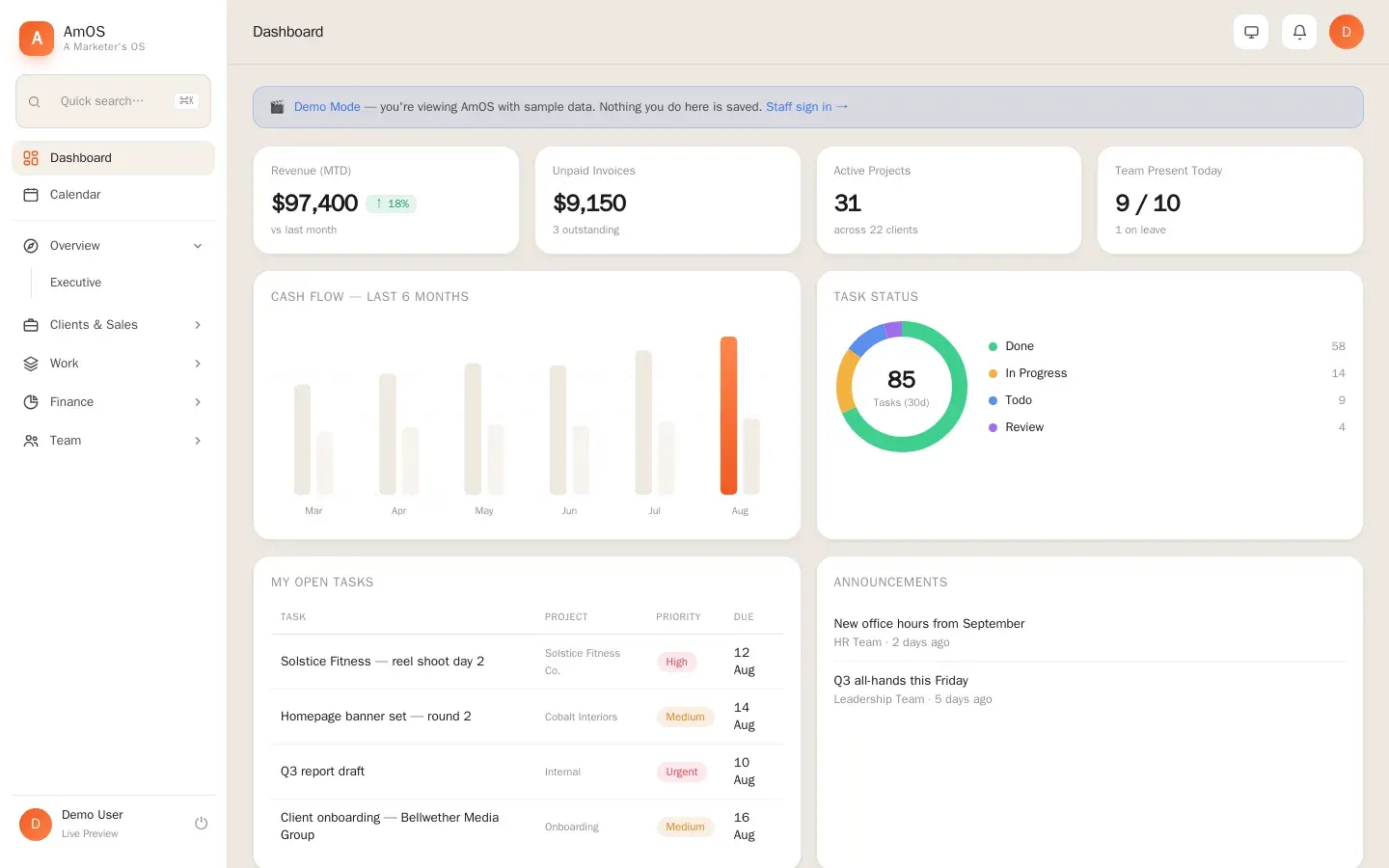
Leads, clients, projects, tasks, the content calendar, people, attendance, payroll, invoices, chat and the company website, all behind one login.
- CRM and lead pipeline with due-today filters
- Clients, health scores and a client portal
- Projects, tasks, approvals and workload
- Content calendar and production tracking
- Invoices, expenses and finance reports
- Team chat, shared inbox and announcements
Lead pipelineThis month
Due today
| Task | Owner |
|---|---|
| Brand deck for Alder & Finch | Maya |
| Reel edit, Juniper Bakery | Tomas |
| Invoice 0142 | Priya |
Demo data. Businesses and people on this screen are fictional.
These screenshots come from AmOS's public demo workspace. It holds sample data only.


- 01Sales and CRM
- 02Clients and portal
- 03Projects and tasks
- 04People and hiring
- 05Attendance and leave
- 06Payroll
- 07Money
- 08Team chat and email
- 09Inventory and deliveries
- 10Website studio
- 11Roles and security
Invoicing, HR, time tracking, messaging, calendars, ads and industry systems. Connect them, import from them, or let AmOS replace them module by module.
59 integrations and import paths across 7 categories
Invoicing and accounting
Keep AmOS as the billing record and sync to the books, or import existing invoices.
- Zoho InvoiceLive now
- Zoho BooksConnect on request
- XeroConnect on request
- QuickBooksConnect on request
- FreshBooksConnect on request
- SageConnect on request
- TallyConnect on request
- WaveRoadmap
- Invoice NinjaRoadmap
- StripeConnect on request
- RazorpayConnect on request
- PayPalRoadmap
HR and people
Bring employees, leave and documents across from the system you use now.
- BambooHRConnect on request
- Zoho PeopleConnect on request
- WorkdayRoadmap
- GustoRoadmap
- DeelRoadmap
- KekaConnect on request
- greytHRConnect on request
- PersonioRoadmap
- CSV or Excel importLive now
Time tracking and attendance
AmOS has its own clock in and out. Existing trackers can feed it or be replaced by it.
- AmOS clock in and outLive now
- Google Sheets attendance exportLive now
- ClockifyConnect on request
- Toggl TrackConnect on request
- HarvestConnect on request
- ApployeConnect on request
- HubstaffRoadmap
- Biometric and QR devicesRoadmap
Messaging and email
Talk to clients and candidates from the record they belong to.
- WhatsApp Business APILive now
- Shared inbox (IMAP and SMTP)Live now
- ResendLive now
- GmailConnect on request
- Microsoft 365 OutlookConnect on request
- SlackRoadmap
- Microsoft TeamsRoadmap
- Twilio SMSRoadmap
Productivity and files
Calendars, documents and storage the team already lives in.
- Google SheetsLive now
- Cloudflare R2 storageLive now
- Google WorkspaceConnect on request
- Google CalendarConnect on request
- Microsoft 365Connect on request
- DropboxRoadmap
- NotionRoadmap
- Zoom and Google MeetRoadmap
CRM, marketing and ads
Leads from every channel land in one pipeline.
- Website forms (Amphin sites)Live now
- Meta lead adsConnect on request
- Google AdsConnect on request
- HubSpotConnect on request
- Zoho CRMConnect on request
- SalesforceRoadmap
- MailchimpRoadmap
- Zapier and MakeConnect on request
Industry systems
For the editions: care, property, staffing and hospitality.
- DBS and compliance checksRoadmap
- Property portals (Rightmove, Zoopla)Roadmap
- Tenancy deposit schemesRoadmap
- Job boards (Indeed, LinkedIn)Roadmap
- POS systems (Square, Toast)Roadmap
- Payroll providersConnect on request
Names are trademarks of their owners and are listed only to show what AmOS connects with. "Live now" connectors are built into AmOS today. "Connect on request" uses the provider's public API or an export file and is set up per client. "Roadmap" is planned, not shipped.
Import from anything
Employees, clients, leads, invoices, timesheets and tasks come in from CSV and Excel exports, with a mapping step and a preview before anything is saved.
Switch without a restart
Run AmOS next to your current tools while the team moves over. Each module can replace the tool it covers: invoicing, HR records, time tracking, chat.
Your data stays yours
Credentials are encrypted, access is role-based, changes are logged, and a full export is available whenever you want to leave.
Connect through open APIs
Where a tool has a public API we connect to it directly. Where it does not, AmOS reads its export files, so nothing is a dead end.
Small teams
From a handful of people. Core modules switched on, set up in days.
Growing agencies and groups
Several offices, regions and currencies, with roles and approvals per team.
Large organisations
Organisation charts, role-based access, audit logs and integrations through APIs. Large rollouts are scoped, load-tested and phased with the client before go-live.
Application
- Next.js 14 (App Router)
- React 18
- TypeScript 5
- Server actions and signed API routes
Data
- PostgreSQL
- Row-level role checks in the app layer
- Daily backups
- Audit trail for sensitive changes
Security
- Signed sessions (JOSE / JWT)
- bcrypt password hashing
- AES encryption for stored credentials
- Rate limiting and consent controls
Files and media
- Cloudflare R2 (S3-compatible)
- Presigned uploads
- Sharp image compression
Email and messaging
- IMAP and SMTP shared inbox
- Resend transactional email
- WhatsApp Business API
Hosting
- Vercel edge network and serverless
- Cloudflare DNS
- Instant rollback
- Separate production and preview environments
Scroll to play AmOS's story, from the first research conversations to AmOS 2.0, or open the bars underneath to read each change.
The problem is named
Amphin, running its own agency, keeps hitting the same wall: leads in one tool, work in another, hours in a third, invoices in a fourth. The idea of one operating system for a service business is written down.
The full timeline
AmOS 2.0
One platform, several named editions: AmOS Core plus CareOS, PropOS, EmplyOS and RestOS, each with payroll and clock in and out shared across them. It is handed to three agencies for testing.
dashboard.amphin.agency
Studio gets its own address, and the website feed is rebuilt to be fast and reliable.
Studio
Studio, the website dashboard, arrives with its own login: media library with compression, visitor analytics, settings and approvals.
Website module and hiring pipeline
The company website now reads from AmOS: portfolio, blogs, services, vacancies, team photos and approvals, plus a hiring pipeline for HR.
Security hardening
A review tightens server actions and public endpoints before AmOS opens to the public website.
Email and integrations
The shared inbox and secure integrations are connected, with keys encrypted at rest.
Leads and invoices
The lead pipeline and invoicing start, so selling and getting paid happen in the same system.
Clients, projects and tasks
Clients, projects and the task board go live, and day-to-day agency work moves into AmOS.
R-Chat, the team chat
The first messages are sent in AmOS's built-in team chat, so conversations stay next to the work.
Files and photos
Cloud file storage is connected for profile photos, documents and client logos.
Its own address
AmOS gets its own addresses at os.amphin.agency and amos.amphin.com, ready for the whole team.
AmOS goes online
The application is deployed on Vercel, so the team can sign in from anywhere.
The first account is created
AmOS starts as Amphin's own operating system. The database is set up and the first team account is created.
Architecture decided
The stack is chosen for security and scale: a relational database, signed sessions, encrypted credentials, object storage and a deployment pipeline with instant rollback.
Pilot conversations
Care, property and agency businesses are interviewed again with early prototypes, which shapes the editions that become CareOS, PropOS and AmOS Core.
First pitch
The concept is pitched to a small circle of businesses. Their feedback decides what has to exist before anyone is invited: security, roles, audit trail and reliable payroll.
Concept and first designs
The first flows and screens are drawn: dashboard, pipeline, task board, attendance and payroll, with the visual language that becomes AmOS.
What teams already use
A survey of the tools businesses depend on (accounting, HR, time tracking, messaging) shapes the rule that AmOS must connect to them and import their data instead of forcing a restart.
Research with real businesses
Conversations with agencies, care providers, property managers and staffing teams map where time and money leak: shifts, timesheets, compliance dates, rent, payroll and follow-ups.
The problem is named
Amphin, running its own agency, keeps hitting the same wall: leads in one tool, work in another, hours in a third, invoices in a fourth. The idea of one operating system for a service business is written down.
Discover
We map how your business runs today: your roles, approvals, shifts and the tools you want to replace.
Configure
AmOS is set up around your structure: departments, permissions, pipelines, pay rules and pricing.
Migrate
People, clients, projects and history move across from spreadsheets and old tools.
Train
Hands-on sessions for owners, managers and staff, so every role knows its daily routine.
Go live and support
We run alongside you for the first weeks and keep improving AmOS as you grow.
Care Nest
A nursing and healthcare recruitment agency: staff, placements and shifts in one system.
PropOSPropKit and Parrot Realty
Property management software for property clients: portfolios, tenants, rent and maintenance.
AmOS CoreAmphin itself
Amphin runs its own agency on AmOS every day, from the first enquiry to the final invoice.
Amphin® is a growth marketing and creative agency with offices in London, Kochi and Abu Dhabi. We build brands, websites, apps and campaigns for businesses, and we build the software we use to run them.
Amphin's team uses AmOS every day. When a client needs a system that does not exist yet, we build it on the same foundation.
- Company
- Amphin LTD, Registered in England & Wales, company no. 15393448. Amphin: Registered as an MSME in India.
- London
- Office 19, 241E High St N, London E12 6SJ
- Kochi
- C3 V Square IT Hub, Kakkanad West, Chembumukku, Edappally, Kakkanad
- Abu Dhabi
- Shams, Ground Floor, Tower 6, Al Reema St, Al Reem Island
- Alberta
- Alberta, Canada
- Sales
- +91 79073 07711
- Main line
- +91 7071 00 77 11
- hello@amphin.com
What is AmOS?
AmOS (A Marketer's OS) is an operating system for businesses that run on people, work and clients. It brings CRM, projects, tasks, HR, attendance, payroll, invoicing, chat and the company website into one secure system. Amphin built it to run its own agency, and AmOS 2.0 adds editions for care providers, property managers, staffing agencies and restaurants.
What is the difference between AmOS Core, CareOS, PropOS, EmplyOS and RestOS?
AmOS Core is the foundation for agencies and service teams. The other editions use the same foundation (people, attendance, payroll, invoices, chat) and add what a particular industry needs: shifts and compliance for care, properties and tenants for property management, candidates and placements for staffing, rotas and labour cost for restaurants.
Is AmOS being used today?
Yes. Amphin runs its own agency on AmOS every day. CareOS was built for Care Nest, and PropOS for PropKit and Parrot Realty. AmOS has also been handed to three agencies, which are testing it now.
Are the demo screens real customer data?
No. The screens on this page use made-up businesses and people (Northlight Studio, Willow Court Care Home, Harbourview Estates, BrightHire Staffing and Saffron & Salt Kitchen). The screenshots in the 'Real screens' section come from AmOS's public demo workspace, which holds sample data only.
Can AmOS be customised for my business?
Yes. Roles, permissions, pipelines, services and modules are set up around each business, and Amphin builds new modules where they are needed.
Which tools does AmOS integrate with?
WhatsApp Business API, Zoho Invoice, Google Sheets, a shared IMAP and SMTP inbox, Resend email and Cloudflare R2 storage are live today. Others, such as Xero, QuickBooks, BambooHR, Clockify and Toggl, connect on request through their public APIs or export files, and more are on the roadmap. The integrations section on this page shows each one with its status.
Can we move our data over from our current software?
Yes. Employees, clients, leads, invoices, timesheets and tasks can be imported from CSV and Excel exports, with a preview before anything is saved. Teams usually run AmOS next to their current tools and switch one module at a time. A full export is available whenever you want it.
Are payroll and clock in and out separate products?
No. Payroll and clock in and out are services you switch on inside any AmOS edition, whether that is AmOS Core, CareOS, PropOS, EmplyOS, RestOS or an OS carrying your own business name.
Can my business have its own OS name?
Yes. Each business can run AmOS under its own name, in the same way as CareOS, PropOS and RestOS: your brand followed by OS. The modules and services you need are switched on inside it.
Is AmOS only for small businesses?
No. AmOS is designed for teams of any size, from a few people to large organisations, with roles, approvals, organisation charts and audit logs. Large rollouts are scoped, tested and phased with the client before go-live.
How do I get AmOS?
Book a demo below. We show it working on a business like yours and plan the setup, data migration and training with you.
Tell us about your team and how you work today. We'll show AmOS set up for a business like yours and plan the setup, data migration and training with you.
Prefer to talk? Call sales on +91 79073 07711.